Find duplicate photos and videos.
Scan a folder and its subfolders for exact copies, review the matches, and choose which files to keep.
Download DupeHarborZIP archive · Requires the .NET 10 Desktop Runtime

Get started
- If needed, install the .NET 10 Desktop Runtime from Microsoft. Choose the Windows x64 installer.
- Download and extract the ZIP archive.
- Open DupeHarbor.exe from the extracted folder.
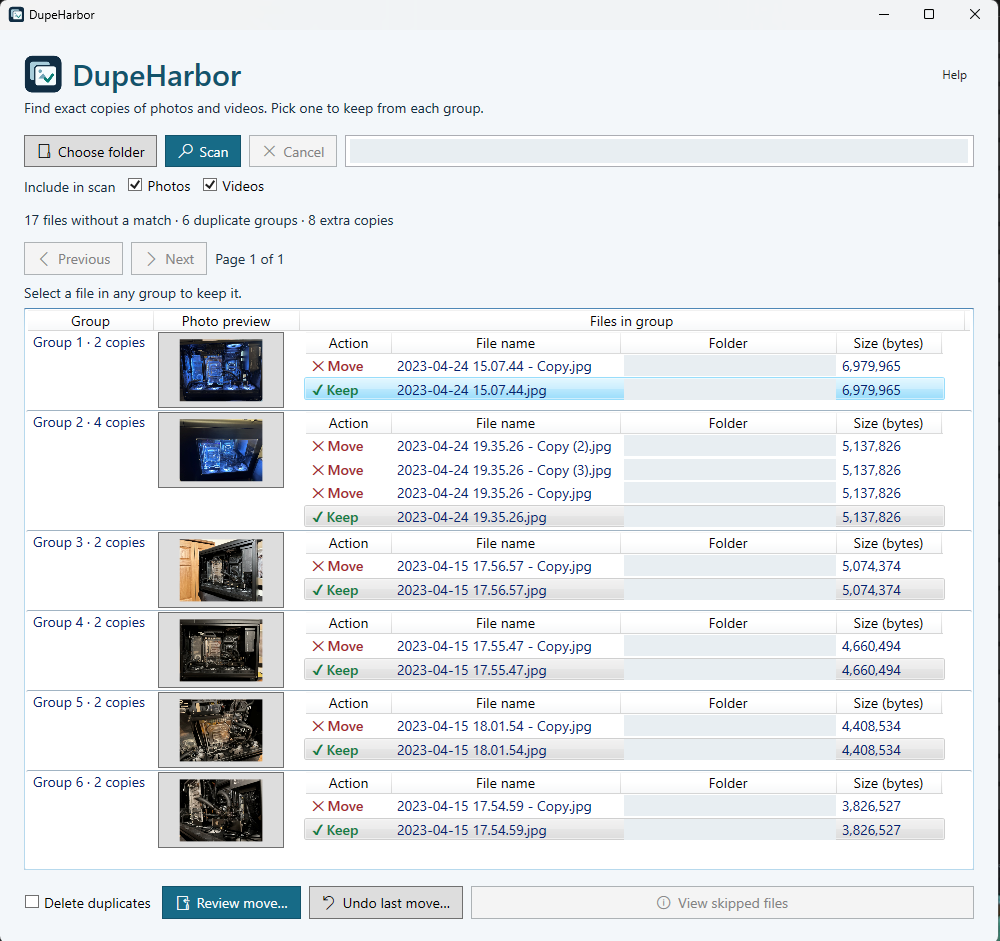
Review duplicate groups before you act
Supported photo and video formats
- Images
- .jpg, .jpeg, .png, .gif, .webp, .bmp, .tif, .tiff, .heic, .heif, .avif
- Camera RAW
- .dng, .cr2, .cr3, .nef, .arw
- Videos
- .mp4, .mov, .mkv, .avi, .wmv, .webm, .m4v, .mts, .m2ts, .mpg, .mpeg, .3gp, .flv, .ts
DupeHarbor compares file contents to find exact duplicates. Photo previews and embedded metadata depend on the codecs available on your PC.
Frequently asked questions
Where do my photos and videos go when I select Move?
After you confirm Review move, DupeHarbor puts the extra copies directly into a folder named DupeHarbor Duplicates inside the folder you scanned. The keeper in each group stays in its original location. If a destination filename is already in use, DupeHarbor adds a number to avoid overwriting it.
Can I undo a move?
Yes. Select the same scan folder and click Undo last move to restore the most recent batch to its original locations. If you chose Delete duplicates, look in the Windows Recycle Bin to restore recycled files.
How does DupeHarbor decide what is a duplicate?
It checks for exact matches by file size and SHA-256 fingerprint. Copies can have different names. Resizing a photo, re-encoding a video, or changing embedded metadata can change its fingerprint.
Why is the .NET Desktop Runtime installed separately?
Installing the .NET 10 Desktop Runtime separately lets Microsoft Update deliver .NET security fixes without a new DupeHarbor release. You can receive these fixes through Windows Update when updates for other Microsoft products are enabled. The separate runtime also keeps the DupeHarbor download smaller.
Does DupeHarbor scan subfolders?
Yes. Select a parent folder to scan it and its subfolders. Use the Photos and Videos checkboxes to choose what to include.